
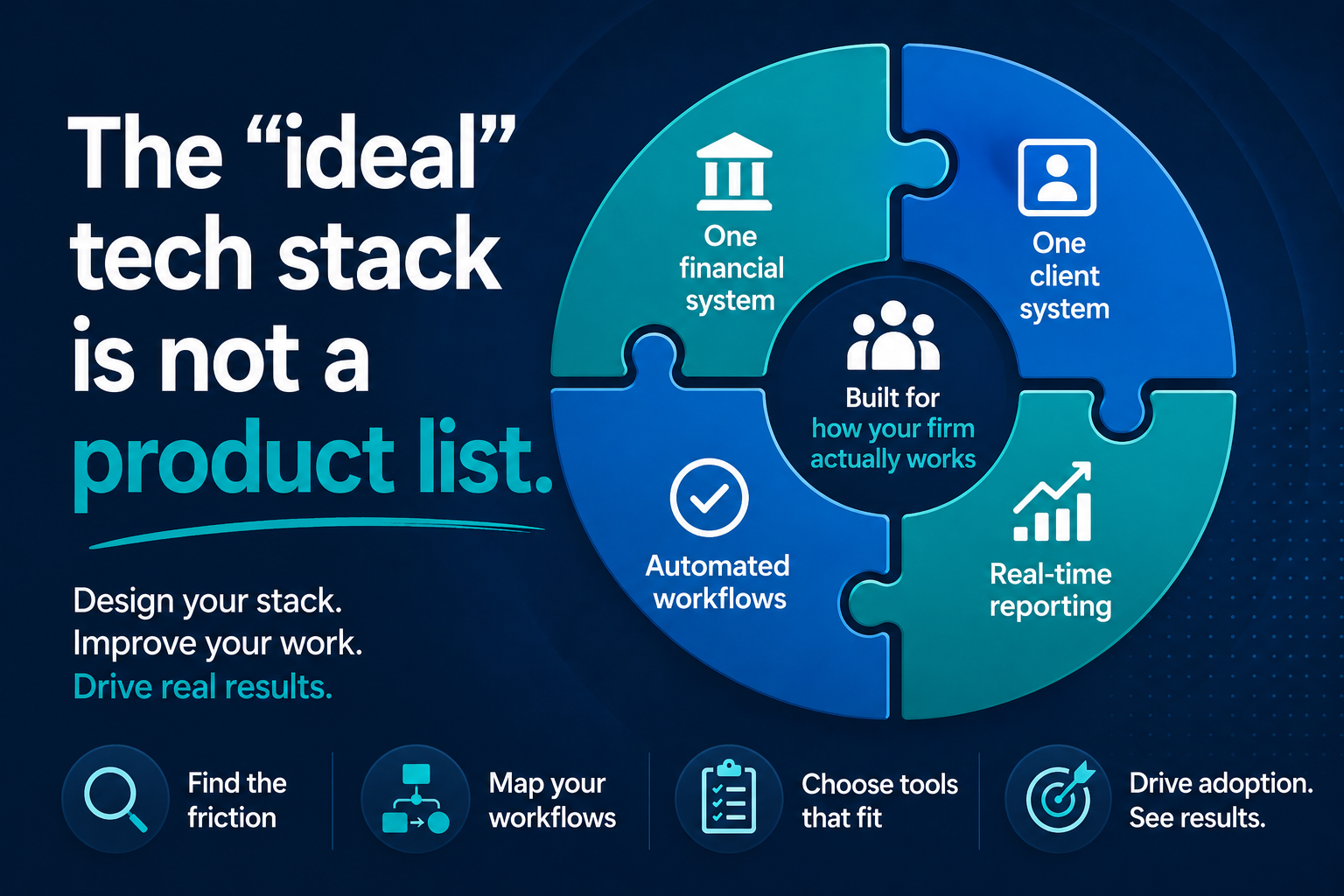
The “ideal” tech stack is not a product list
By Michelle Serna
Show of hands. How many tools has your firm bought in the last twelve months that your team isn’t fully using? Two? Three?
You’re not unusual. You’re in the room.
Between the two of us, we have spent the last decade walking into firms with tech stack problems and watching the same patterns repeat. The patterns are not what the consulting industry tells you they are. Firms don’t fail because they picked the wrong ERP. They fail because they bought tools before they defined the work the tools were supposed to do.
If you have a stack problem, the first thing worth understanding is that it is almost certainly a design problem, not a tooling problem. And design problems get solved by asking better questions, not by buying more software.
The reality nobody puts on a slide
In ten years of implementations, the same four conditions show up at almost every firm. Different industries, different sizes, same four.
You are paying for tools you don’t fully use. Pull your subscription list this week. About 30% of it is shelfware.
Your team still relies on spreadsheets and workarounds. The Excel export is the universal sign that the system isn’t doing the job it was sold to do.
Your systems don’t actually talk to each other. You bought integration. You got two databases that share a logo.
Reporting is delayed, manual, or inconsistent. By the time leadership sees the number, the quarter is already over.
The instinct, every time, is to buy another tool. Adding more tools won’t fix it. Adding more tools is usually what caused it in the first place.
What an ideal stack actually looks like
The ideal tech stack is not a product list. It is not Dynamics plus three add-ons plus a BI tool. It is the stack that fits how your firm actually works and that your team actually uses.
There are four capabilities every firm needs. These are capabilities, not brand names. Brands are interchangeable, but the capabilities are non-negotiable.
One financial system. Your ERP is the backbone. Every revenue and expense transaction flows through it. If your ERP isn’t the source of truth, nothing downstream can be.
One client system. Your CRM owns the relationship. Pipeline, engagement, communication. The moment a client signs, the engagement, billing terms, and contact records flow into the financial system without anyone re-typing them.
Automated workflows. Approvals, handoffs, and notifications happen inside a system. Not in email. If a critical step lives in someone’s inbox, it is invisible and untrackable.
Real-time reporting. Dashboards pull live data. No exports. No lag. No “let me get back to you with the number.”
If you can’t say in one sentence which system owns each of these four capabilities at your firm, that is your gap. Write it down. That is the start of your roadmap.
The three-step method
Step one is uncomfortable. Before you buy anything, before you evaluate anything, go find the friction. This is the first hour of every consulting engagement. Walk the floor. Sit with a senior associate. Ask four questions.
Where are you re-entering data from one system into another? Double entry means integration is missing.
Where do approvals stall? If approvals live in email or chat threads, they are invisible.
Where is email functioning as the system? Email is not a workflow tool. Critical steps in inboxes get lost.
Where does leadership lack real-time visibility? If you cannot see pipeline or operational status without asking someone to pull a report, there are gaps.
Your inefficiencies are your roadmap. You do not need a consultant for this part. You need an hour and a notepad.
Download your Tech Stack Assessment
Step two is to map your core workflows. Every professional service firm runs on three to five of them. Client onboarding. Revenue from engagement to cash. Expenses from vendor to payment. Service delivery from kickoff to completion. Map the steps end-to-end. If your systems do not support these workflows end-to-end, they are not aligned. They are just sitting next to each other.
Download the Workflow Mapping Template
Step three, only now, do you start choosing tools. And when you do, four questions.
Does it reduce steps or add steps? If a new tool adds complexity without removing friction, skip it.
Does it connect to my core system? Standalone tools create data islands. Integration is not a feature. It is the foundation.
Will my team actually use it? The best feature set is worthless if adoption is low.
What about twelve months from now? Choose tools that scale. Avoid solutions you will outgrow in a year.
Integration matters more than features. A great tool that lives in a silo is worse than a good tool that lives in your stack.
Read our blog on Ten automations you can build with the Microsoft licenses you already own
The Microsoft ecosystem, briefly
We work primarily in the Microsoft ecosystem, so a quick note on what we see firms get right and wrong with it.
Business Central is the financial backbone. The most common mistake is treating it as one of several data sources instead of the data source. The moment you have two systems claiming to own the financial truth, you have built reconciliation into your business model. That is not a system. That is a tax.
Dynamics 365 is the client relationship layer. Pipeline, engagement, communication. The CRM connects to Business Central so when a client signs, the engagement, billing terms, and contact record flow through. The connection is where firms either nail it or fake it. Native connectors do real work. Bolt-on connectors create the appearance of integration. Big difference.
Power Platform is where most firms either win or struggle. Automation, custom apps, BI. You fill gaps with this layer. You do not fill them with new SaaS subscriptions. Most firms in this room already own Power Platform. You just haven’t deployed it.
Copilot is AI layered across all of it. Powerful, but only on clean data. Foundation, then orchestration, then AI. Not the other way around. If your data is fragmented, AI amplifies the problem. It doesn’t solve it.
The five expensive mistakes
We have collected enough war stories that we can name the mistakes that show up most. If any of these sound familiar, slow down before you spend more money.
Buying before defining. Don’t purchase tools before you’ve mapped your processes. Ever.
Over-customizing early. Start out-of-the-box. Customize only after you know what you actually need. Half the failed implementations we have cleaned up were over-engineered in month one.
Ignoring adoption. If your team won’t use it, you wasted every dollar.
Everything at once. Big-bang implementations fail. Phase it. Win early. Build momentum.
Assuming you’re done. Implementation is not success. Adoption and evolution is.
What changes when it works
A mid-size firm we worked with went from a multi-week billing cycle down to under two weeks in their first quarter post-integration. The team did not work harder. The system stopped fighting them. CRM connected to ERP. Invoices generated when work was approved. Dashboards updated in real time. Approvals tracked, not buried.
The side effect nobody talks about is staff retention. When senior people stop doing data reconciliation at 9pm on a Thursday, they stay longer.
The formula
Clear processes. Plus connected systems. Plus clean data. Plus strong adoption. That is the formula. The whole talk on one line.
The firms that win aren’t the ones with the most technology. They are the ones who make their technology work together. That is not a software problem. It is a design problem. And it is solvable.
Curious where the friction is in your own stack? Tell us where it hurts.